Operator Handshake

Whim

WHIM

Local-First AI Terminal

A unified desktop and mobile ecosystem for voice AI, local LLM chat, weather radar, APRS radio, geofencing, IoT control, and vehicle integration. No cloud dependencies. No subscriptions. Your hardware, your models, your rules.

Get Started What is Whim?
98s · 720p60 · Narrated Overview

// what is whim

The Product

One terminal. Everything connected.

Whim is a Python desktop application (Tkinter) with 20 module tabs organized across two rows. It connects to local LLMs through Ollama (DeepSeek R1:32B, Llama 3.1:8B), drives a voice pipeline with XTTS v2 text-to-speech and wake word detection, controls Samsung SmartThings devices, integrates Signal and Discord messaging, runs a weather radar with NEXRAD overlay, monitors APRS amateur radio stations, tracks livestock via geofencing, manages Android devices through ADB, and now includes a persistent AI memory system (GBrain) with knowledge graph, entity tracking, timeline view, and natural language brain search.

A companion mobile app (Whim.m) runs on Android phones and tablets, connecting over a reverse SSH tunnel through a VPS or directly via Tailscale mesh VPN. A vehicle dashboard interface (Whim.v) runs on a 13.6" Android head unit with its own local model for offline autonomy.

All AI inference is local. All data stays on your network. The system works in a tunnel, in a field, in a garage -- anywhere your hardware lives.

CHAT WHIM.AI SMARTTHINGS SYS STATUS AVR LAB VOICE ENGINE PERSONA TRV CIPHER DOPPLER GEOF HAM NODEFLOW ARCHIVE DISCORD SIGNAL SS LIBRARY OPUS EMAIL BRAIN SETTINGS
Whim Desktop Terminal
Whim Terminal -- Desktop AI workspace
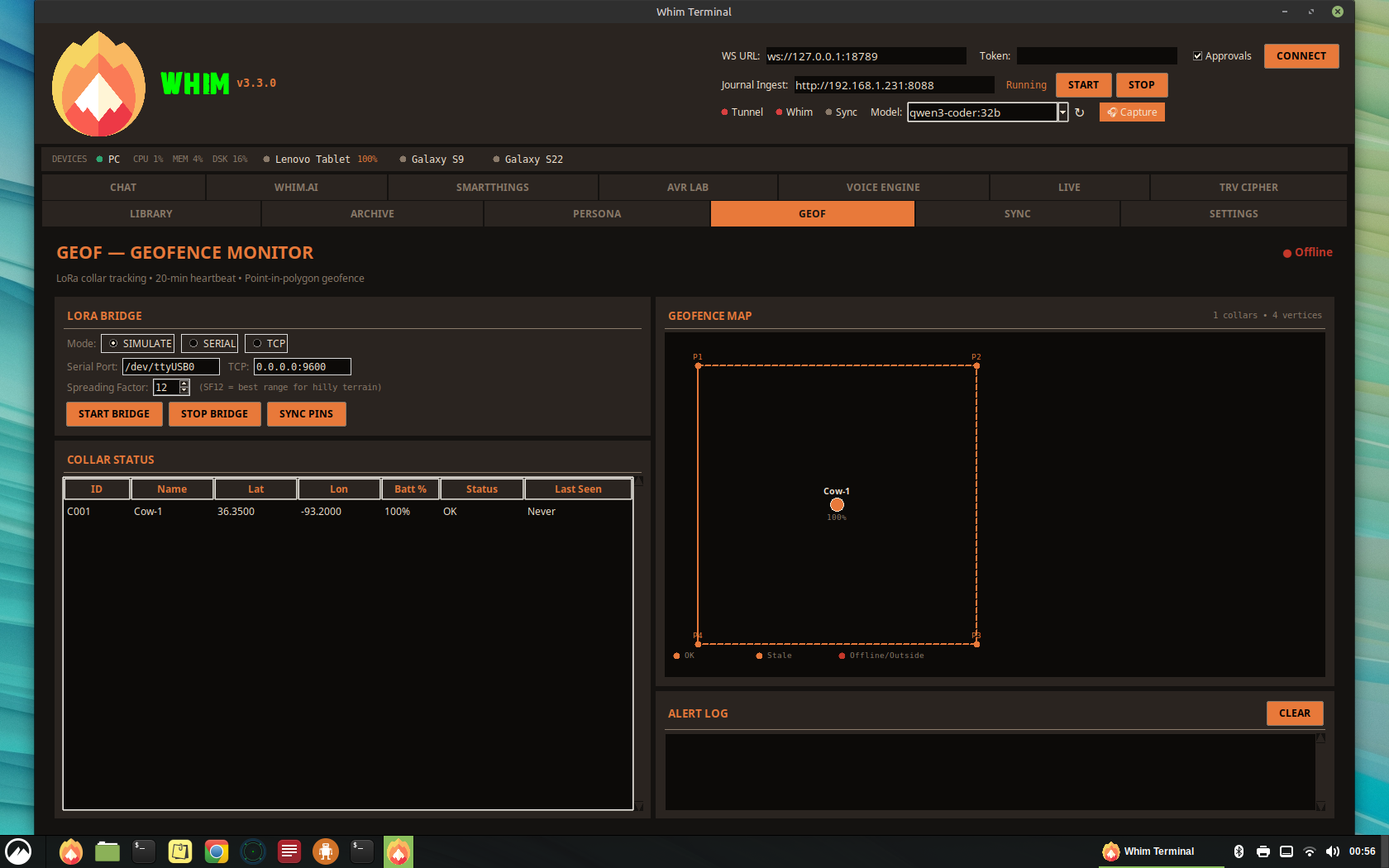
GeoF Tab
GeoF -- Geofence map with collar status tracking
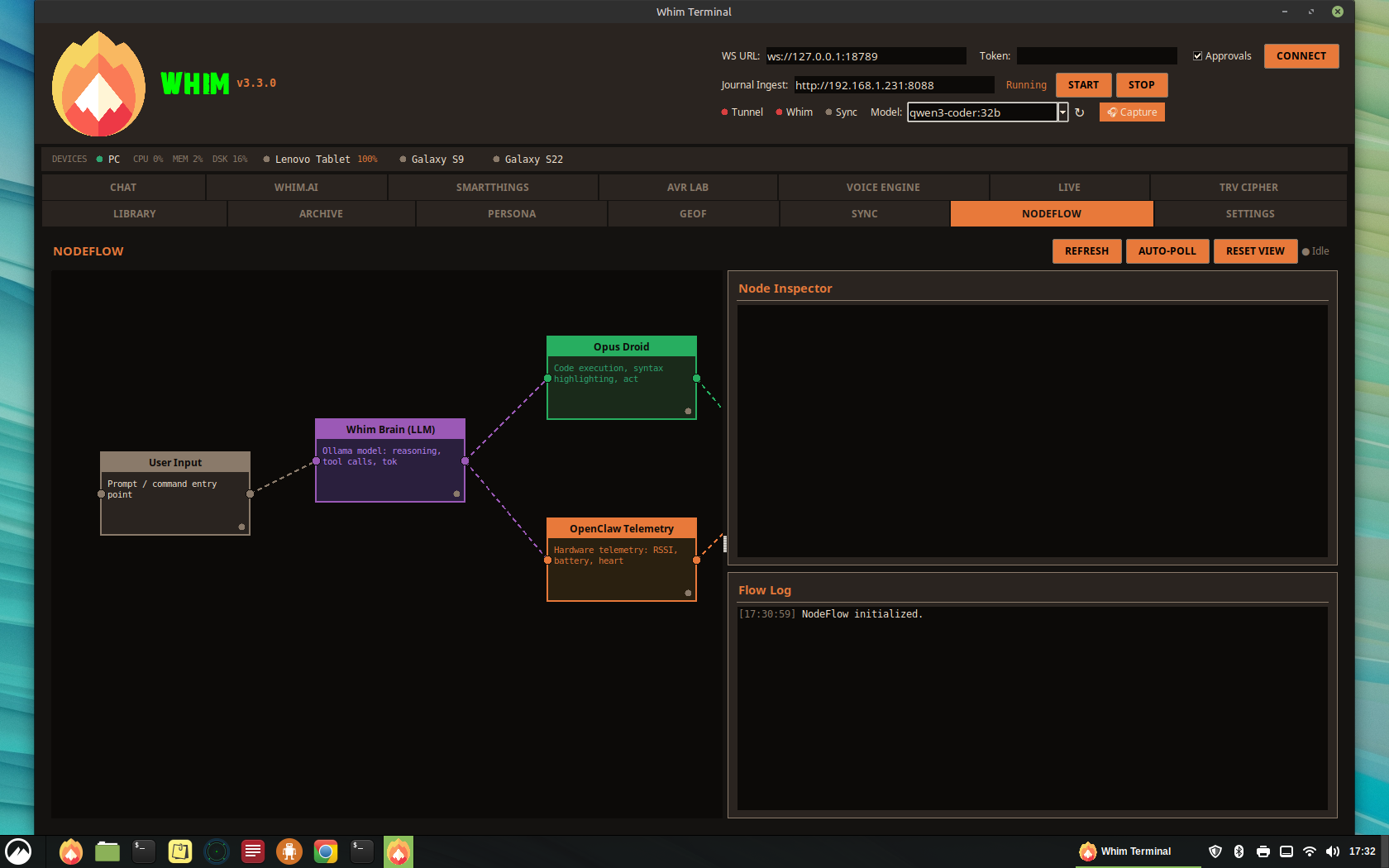
NodeFlow visual editor
NodeFlow -- Visual node editor showing active droids and data flow
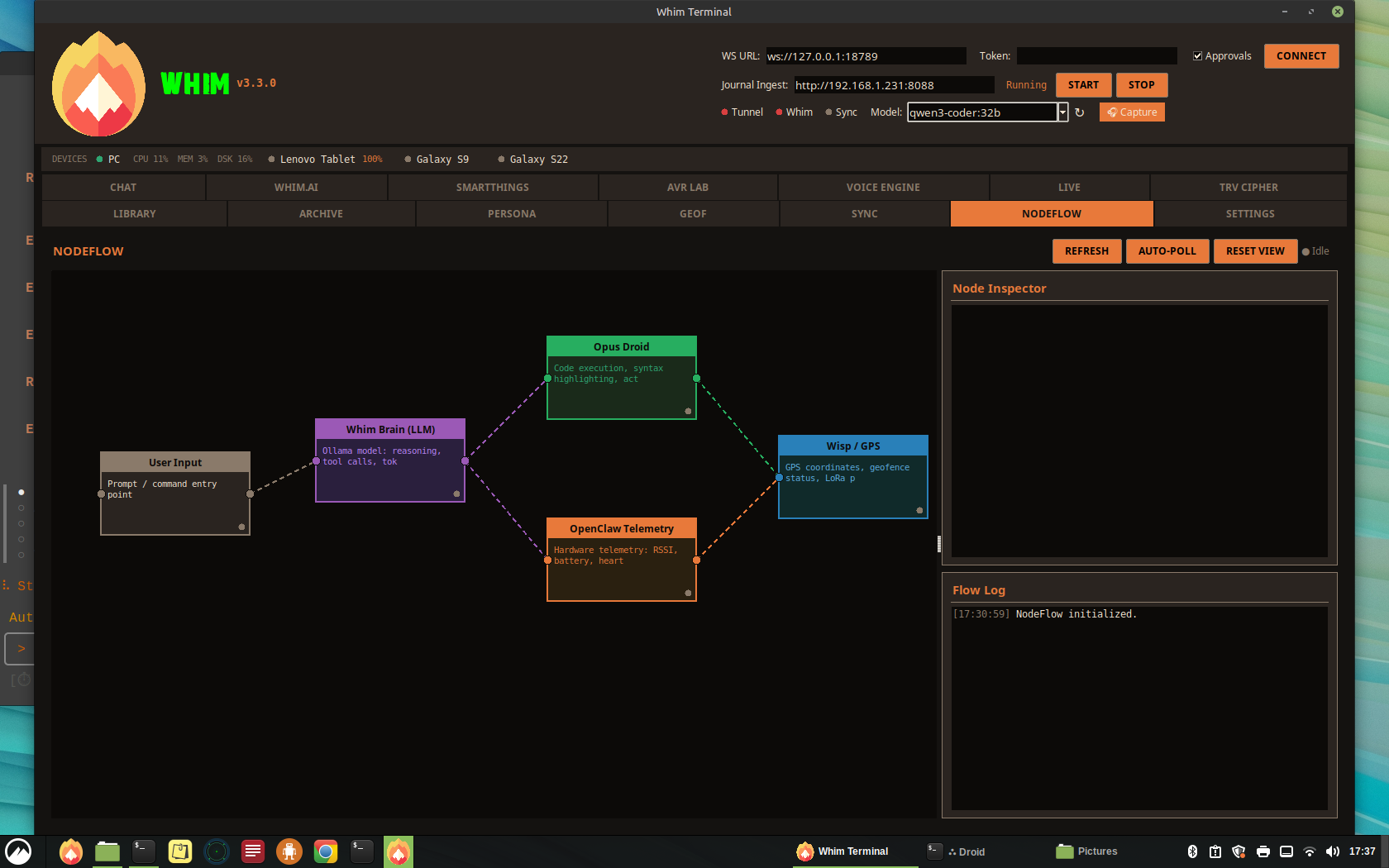
NodeFlow expanded
NodeFlow -- LLM reasoning chains and OpenClaw telemetry
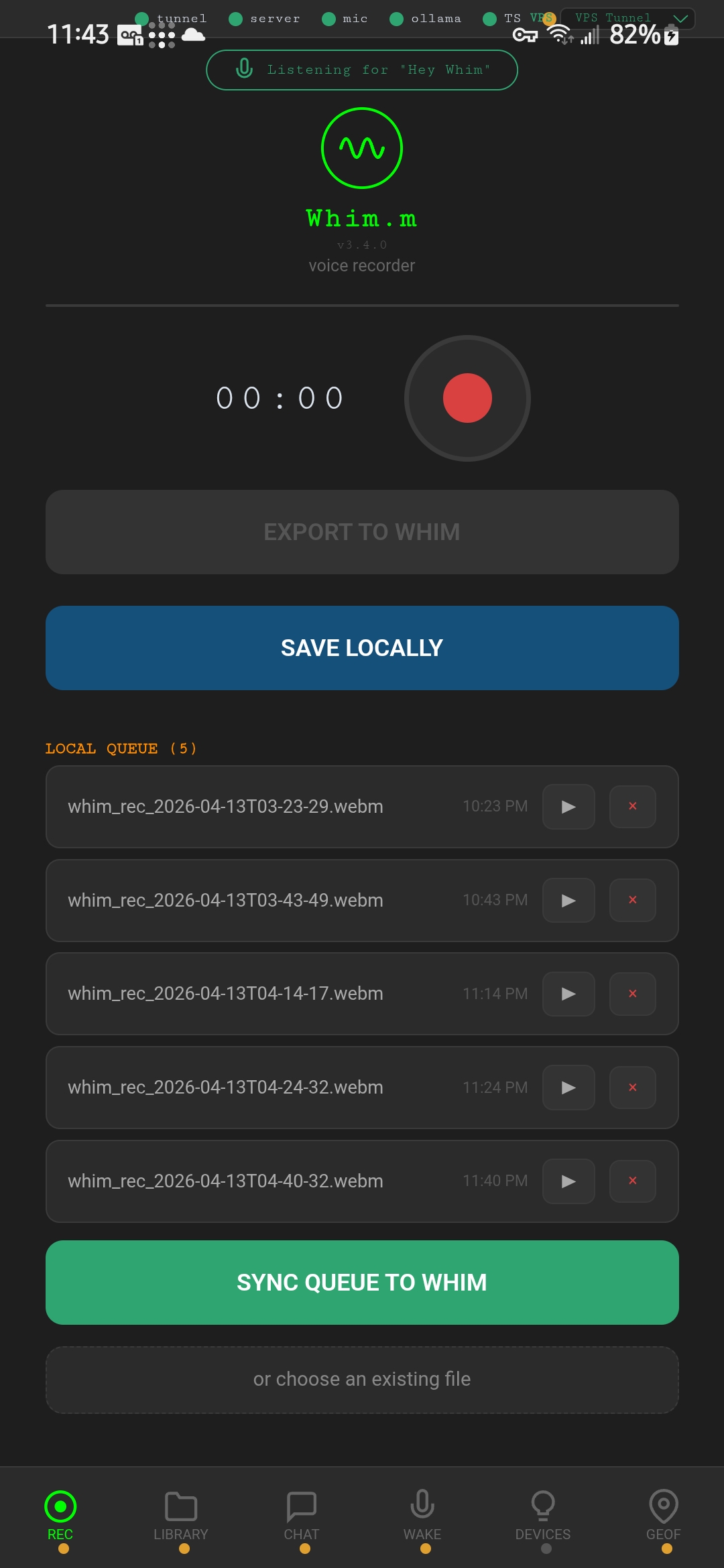
Whim.m recorder
Whim.m -- REC tab
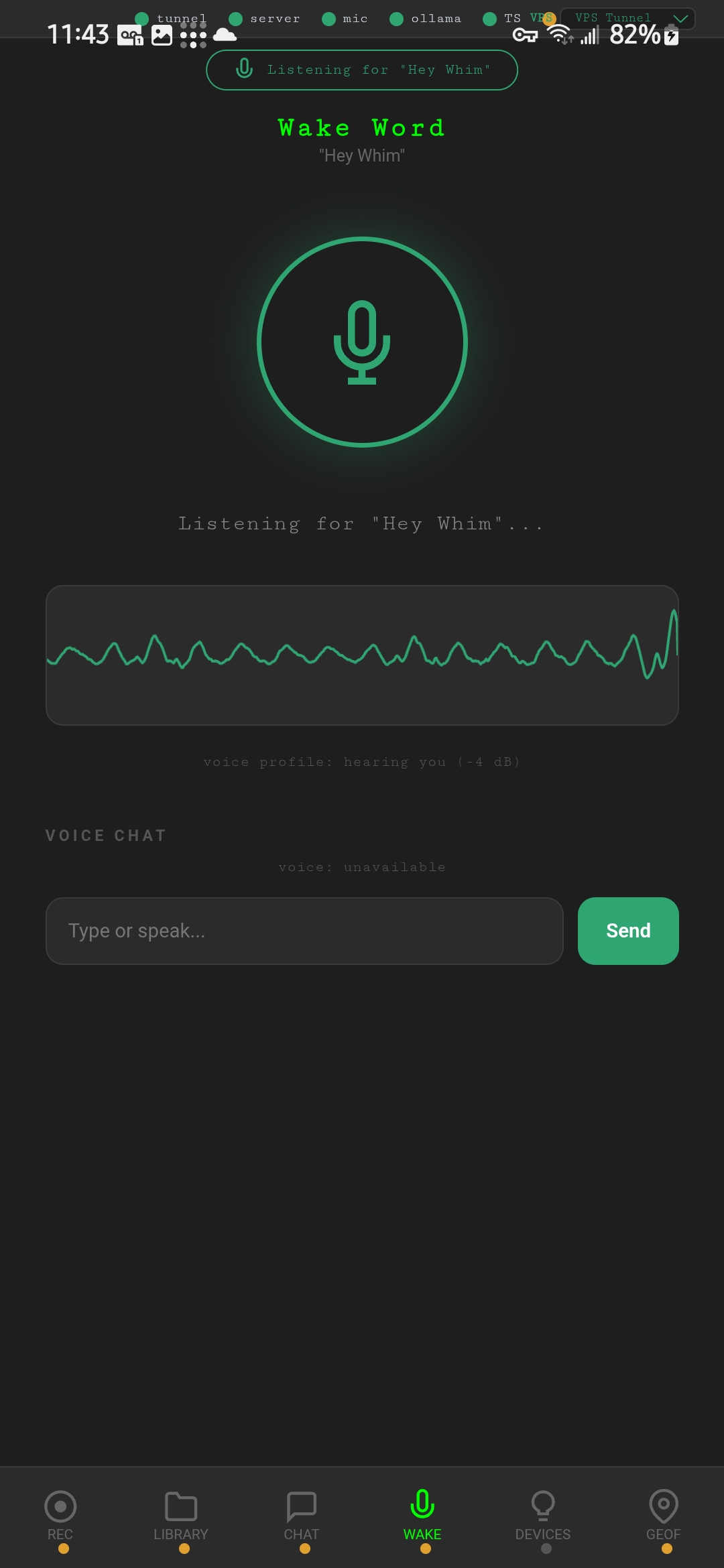
Whim.m wake word
Whim.m -- WAKE tab
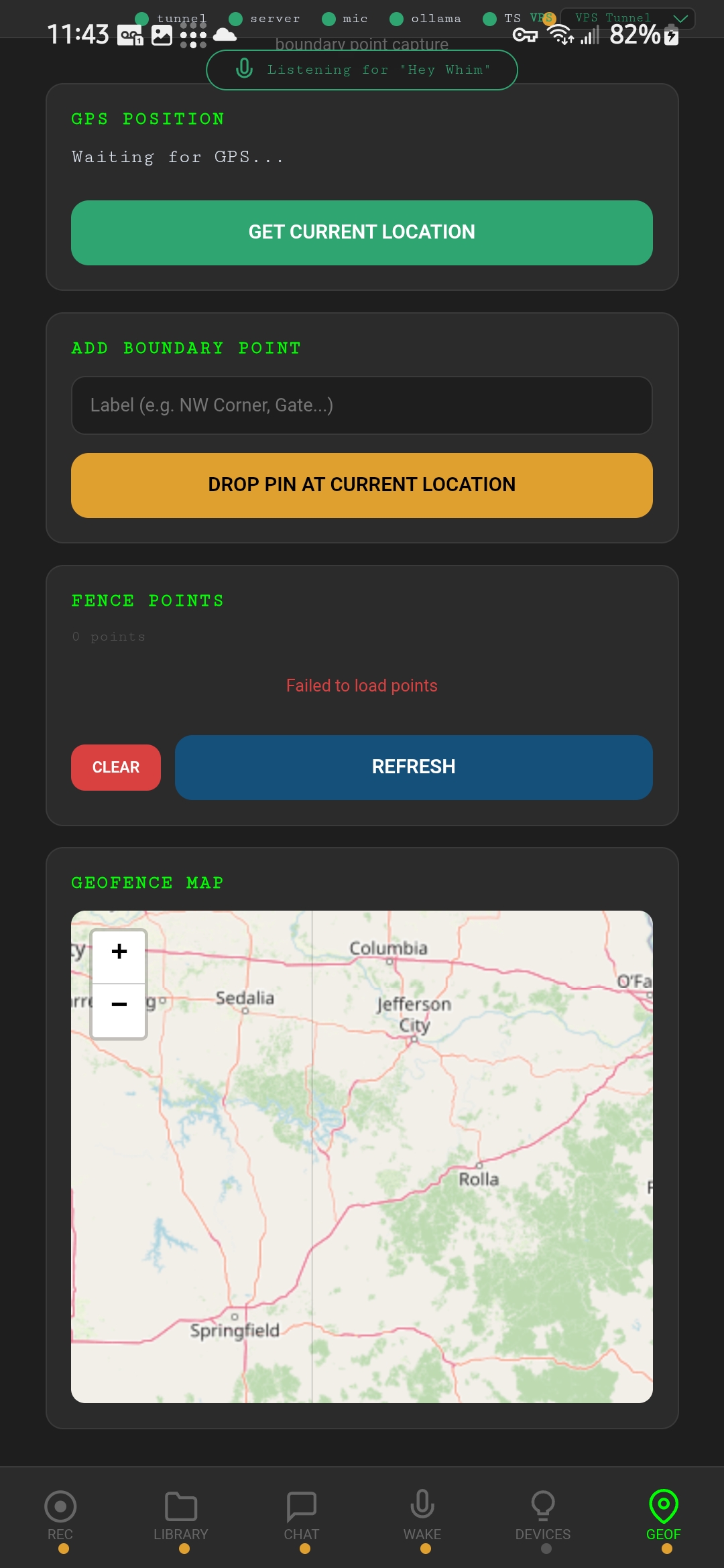
Whim.m geofencing
Whim.m -- GeoF tab

// features

What It Does

Every tab is a standalone module. Pick the ones you need, disable the rest. Build your own stack.

Whim.AI -- Local LLM Console Core

Full AI chat with local Ollama models. System presets, observability panel, context metering, tool trace, output templates, and token usage tracking. Switch between DeepSeek R1:32B (reasoning), Llama 3.1:8B (fast chat), and Qwen (tool use) from the header dropdown. GBrain knowledge retrieval via /gbrain commands, ecosystem dictionary context injection, and cloud fallback routing when local models are unavailable.

Voice Engine Audio

Wake word detection (openWakeWord / Porcupine), live spectrogram (Whim-Scope), dynamic gain, high-pass filter, AGC, parametric EQ, spectral subtraction, VAD, and a confidence ghost bar. Tuned for noisy vehicle and outdoor environments.

AVR Lab + Persona Voice

XTTS v2 text-to-speech with custom speaker references. Persona manager with coined response playlists per voice clone, confidence-gated, context-aware, pre-rendered. Spectrogram visualization and Table Reads output.

Doppler -- Weather Radar Telemetry

Embedded OSM tile map with NWS NEXRAD precipitation overlay. Open-Meteo conditions, 7-day forecast, anemometer, NWR audio via web stream and RTL-SDR. Severe weather alerts pushed to mobile devices.

GeoF -- Geofence Tracker Location

Canvas map with fence pin management, collar status table, LoRa bridge integration, and 20-minute heartbeat monitor. Originally built for livestock tracking on rural property.

HAM -- APRS Monitor Radio

Amateur radio station monitor with embedded tile map, Direwolf integration (KISS/AGWPE/simulate), station list with distance filtering, base station config, and raw packet log.

SmartThings IoT

Samsung SmartThings device browser with scan, filter, favorites, device detail, and recently-controlled history. Control lights, locks, and sensors from the terminal.

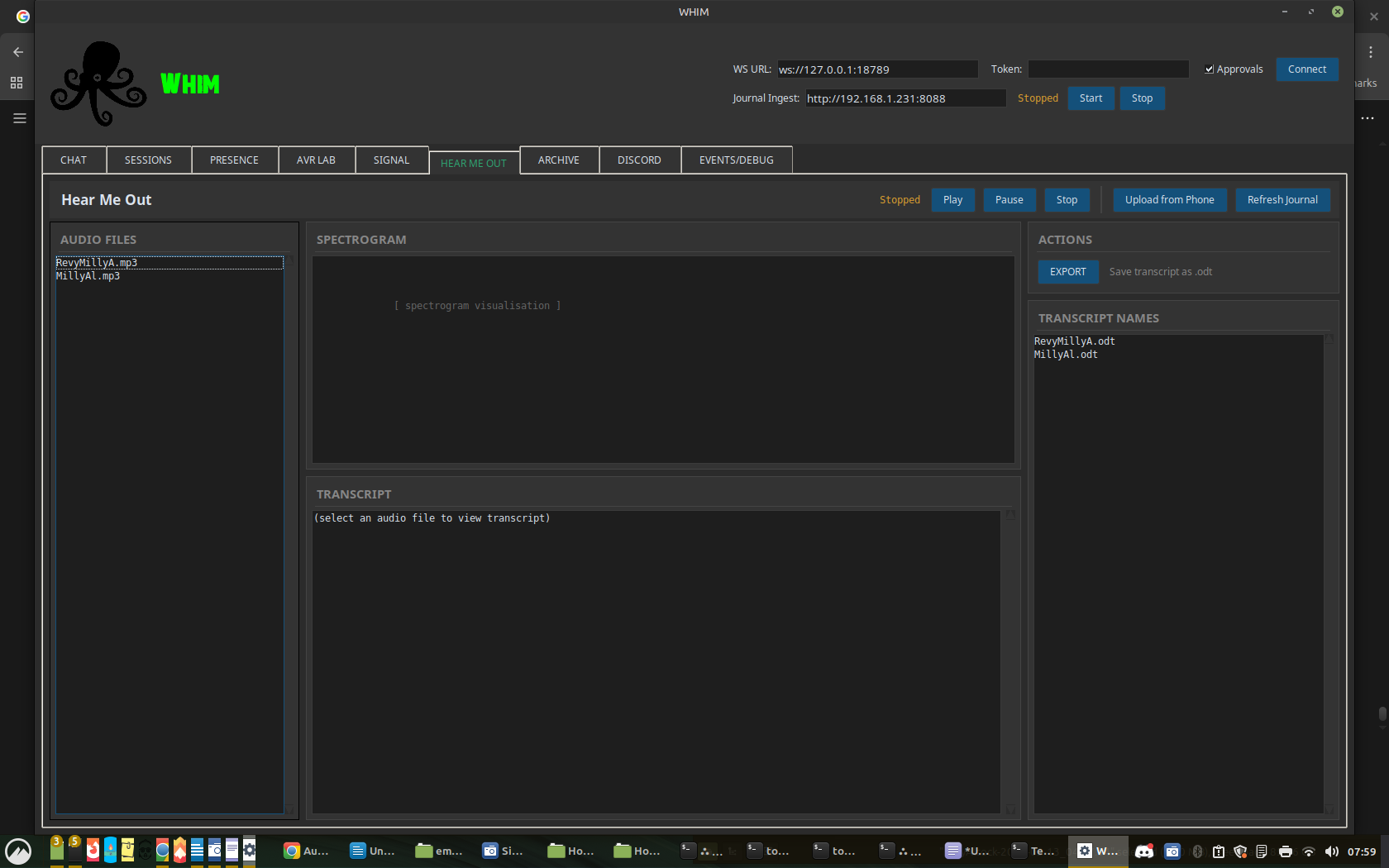
TRV Cipher Transcription

Audio transcription workstation with spectrogram, playback transport, Whisper-based transcription, ODT export, and scrub tools. Process voice recordings into searchable text.

NodeFlow Visual

Visual node-based flow editor showing active droids, LLM reasoning chains, OpenClaw telemetry, and data flow connections. Drag-and-drop canvas with auto-poll and node inspector.

Signal + Discord Messaging

Integrated messaging through Signal Desktop (via signal-cli) and Discord bot. Send and receive messages directly from the terminal.

Screen Share + ADB Portal Devices

MJPEG screen share server with QR code pairing, phone camera feed, and desktop preview. ADB portal for APK installation, emulator management, and device screenshots.

OpenClaw Gateway Protocol

JSON-RPC over WebSocket (port 18789). The AI agent protocol layer connecting the terminal to Ollama inference with model switching, context injection, tool definitions, and multi-model routing.

BRAIN -- GBrain Knowledge Engine Memory

Persistent AI memory powered by GBrain (PGLite + pgvector). Natural language search with type filters (Pages, Entities, Timeline, Repos), Entity Explorer with backlink visualization, Timeline View with date range selectors, Dream Cycle scheduler, Obsidian-compatible export, and auto-enrichment triggers. Ctrl+Shift+G opens a quick brain query from any tab. Droid write permissions require explicit user confirmation.

Email -- Himalaya Integration Communication

CLI email client integrated directly into the terminal and Whim.ai chat. List inbox headers, read individual messages, search across mailbox. IMAP/SMTP configuration in the Settings tab. No browser required.

Whim Dictionary Context

43-term ecosystem glossary injected into every Whim.ai system prompt. Provides the AI with knowledge of all subsystems, GitHub repository locations, device names, and GBrain integration context. The AI knows what Whim is and where everything lives.

Conversational Voice States

The voice pipeline uses state-aware backchannel cues -- color-coded, timed, and honest about what the system is actually doing.

Listening
Captured
Thinking
Holding
Speaking
Interrupted

// system topology

Architecture

A federated mesh of nodes. Each device operates autonomously, syncs when connected, stays independent when offline.

Drag to orbit · Scroll to zoom

Network Topology

DeviceLAN IPTailscale IPRole
PC (CARRAMint)192.168.1.231100.69.17.20Server hub
Galaxy S22--100.77.59.2Primary mobile
Galaxy S9192.168.1.198100.97.96.1Secondary mobile
Lenovo Tablet192.168.1.112100.64.255.124Tablet client

Connection Channels

ChannelProtocolPortPurpose
OpenClaw GatewayWebSocket18789Core command bus
Whim.m ServerHTTP8089Mobile app backend
Journal IngestHTTP multipart8088Voice recording upload
Screen ShareMJPEG8091Desktop-to-phone stream
SSH TunnelReverse SSH via VPS8089Cross-network access
OllamaHTTP REST11434LLM inference
Signal CLIHTTP8080Messaging

// edge match

Hardware & Model Matching

Local AI runs on your GPU. Select your hardware and we'll tell you which models fit.

Tier Parameters VRAM (Q4/Q8) Suggested Hardware Whim Performance
Edge / Mobile 1B - 3B 2 - 4 GB iGPU / Steam Deck / RPi / 8GB RAM Near-instant response
Standard 7B - 9B 6 - 10 GB RTX 3060 / 4060 / M1-M3 Mac Snappy (30+ t/s)
Pro / Coding 12B - 14B 12 - 16 GB RTX 4070 / 3080 / M-Pro Thoughtful reasoning
Research 30B - 35B 20 - 24 GB RTX 3090 / 4090 / 5090 / M-Max Deep analysis
Sovereign 70B+ 40 GB+ Dual 3090s / M-Ultra Human-level complexity
VRAM Tax: Your OS, browser, and desktop compositor consume 1-2 GB of VRAM. An 8 GB card effectively has ~6.5 GB available for model inference. Plan accordingly.
auto-detect (coming soon)
# Let Whim probe your hardware and pull the optimal model
$ whim init --match
# Detected: RTX 4070 12GB -- Tier: Pro/Coding
# Pulling: deepseek-r1:14b-q4_K_M ...

// get started

Install & Run

Clone, configure, launch. No accounts, no cloud keys, no telemetry.

whim-terminal -- bash
# Clone
$ git clone https://github.com/scarter84/whim-terminal.git
$ cd whim-terminal

# Environment
$ python3 -m venv venv
$ venv/bin/pip install -r requirements.txt

# Local AI (Ollama)
$ curl -fsSL https://ollama.ai/install.sh | sh
$ ollama pull deepseek-r1:32b
$ ollama pull llama3.1:8b-16k

# Launch
$ venv/bin/python openclaw_tkui.py

Platforms

Whim Terminal

Desktop command center
Linux (primary) / macOS / Windows

GitHub
📱

Whim.m

Mobile companion APK
Android 10+ (S22 / S9 / Tablet)

Download APK
🚗

Whim.v

Vehicle dashboard
13.6" Android head unit

In Development

Requirements

DependencyVersionPurpose
Python3.10+Runtime
TkinterbundledDesktop UI framework
OllamalatestLocal LLM inference
TailscaleoptionalMesh VPN for mobile/vehicle
Coqui XTTS v2optionalVoice synthesis (requires GPU)

// community

Build With Us

Whim is for creators and developers who believe AI should run on hardware you own. Friction-free. Open source. Pushing AI forward together.

Write a Module

Every tab is a pluggable Python module. Write your own, drop it in, share it. GeoF, HAM, Doppler -- they all started as standalone modules. The tab system is config-driven: enable what you need, disable the rest.

Join the Discord

Talk to Enoch (the OpenClaw bot), share your builds, debug configurations, and help shape the roadmap. The community runs on the same sovereign principles as the software.

Read the Manual

Full system documentation: architecture topology, voice engine tuning, networking setup, tab reference, and deployment guides for Linux, macOS, Windows, and Android.

Open Source

No gated features. No premium tiers. No data collection. MIT licensed. AI should evolve alongside the people building it, not behind a paywall.